Preview unavailable. Open video.
01 / Route & local control
Follow a path. Coordinate the body.
A prescribed route guides travel; a wrist cue adds a local target to the same motion.
Your cues. One coherent motion.
Learning Implicit Motion Planning from Composable Kinematic Cues
Specify the moments that matter. AnimateCanvas organizes a coherent full-body action around them—connecting key poses, routes, local controls, and editable motion context in one model.
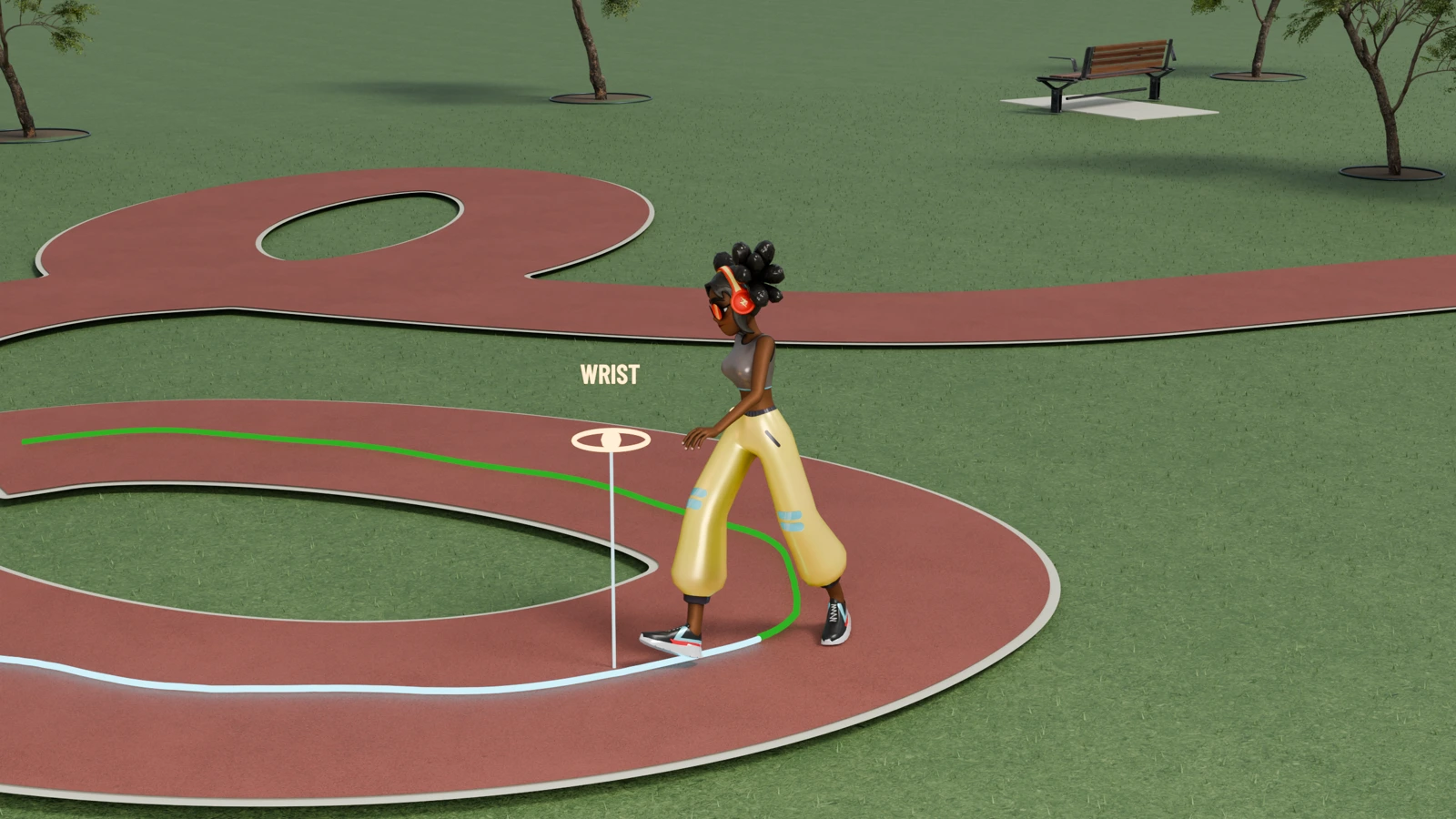
Kinematic cues specify parts of an action. AnimateCanvas infers a coherent full-body trajectory through these partial motion states, coordinating the motion between and around them.
Full video
A continuous character demonstration, from drawing a route to directing a jump or a gesture, with an introduction to the method. English narration and captions are included.
The video could not load. Please retry or use the download links below.
Creating character animation takes more than a text prompt. Artists sketch routes, place poses, direct body parts, and preserve existing motion. AnimateCanvas represents position and rotation cues on a shared motion canvas. A shared flow model coordinates the motion. Cue imputation preserves the specified canvas values throughout generation.
A dense route specifies where to travel. A local wrist cue controls one body part without specifying the rest of the motion. Sparse foot targets and root-heading constraints leave the transitions open. AnimateCanvas connects them with a continuous, coordinated gait. Position and rotation cues can be combined across body parts and time within a single motion. A few pose and trajectory cues shape the jump, while the model completes its timing and whole-body coordination.
An existing motion can also serve as editing context. Here, the original motion provides editing context, while language changes the gesture to wave the right hand. The edited motion follows the instruction while maintaining a coherent surrounding action. Compatible cues share the same motion canvas, so one generator can complete motion under their combined constraints.
Local targets guide the strike, while the model coordinates stance, timing, and recovery. This is cue-conditioned implicit motion planning: connecting the partial states prescribed by cues into one coherent full-body trajectory. Here, we provide the hoop position at the dunk time. AnimateCanvas plans the full motion around it. Thank you for watching.
Goodbye.
Character showcase
Six moments from the full film. Each highlights what is specified—and what the character must coordinate around it.
Preview unavailable. Open video.
A prescribed route guides travel; a wrist cue adds a local target to the same motion.
Preview unavailable. Open video.
Foot targets and facing constraints leave the intervening motion to the model.
Preview unavailable. Open video.
A jump combines pose and path constraints with whole-body coordination.
Preview unavailable. Open video.
An existing motion provides context; language directs the change in gesture.
Preview unavailable. Open video.
Local cues guide the hands as the body coordinates stance and recovery.
Preview unavailable. Open video.
The hoop position is supplied at the dunk time to guide the complete action.
These clips are excerpts from the rendered demonstration. Benchmark samples and their evaluation viewers are provided below.
From the benchmarks
24 AnimateCanvas inference cases: four per benchmark, from temporal and body-part control to sequential generation, instruction editing, style–content editing, and text-to-motion. Each includes the input and its source viewer.
Temporal control Amber poses are supplied; blue poses are generated.
Body-part control An orange wrist marker identifies the controlled joint at cue frames.
Editing Input motion is on the left; the AnimateCanvas edit is on the right.
Preview unavailable. Open video.
Temporal control · HumanML3D
Input First frame + text
Continue a golf swing from one supplied pose.
Inspect case 014457Preview unavailable. Open video.
Body-part control · HumanML3D
Input Sparse left-wrist position targets + text
Cross both arms in front of the chest, then lower them, guided by sparse left-wrist targets.
Inspect case 001014Preview unavailable. Open video.
Sequential generation · BABEL
Input Stand → walk left → stop and stand
Follow three timed action descriptions with a continuous start, sideways walk, and stop.
Inspect case val_6604Preview unavailable. Open video.
Instruction editing · MotionFix
Input Input motion + “Make a wider turn”
Compare the input motion with the language-directed edit.
Source viewer · select case 0003Preview unavailable. Open video.
Style editing · Style–content benchmark
Input Input motion + “Perform hop in the angry style”
Keep the hopping action while changing its expressive style.
Source viewer · select style case 0000Preview unavailable. Open video.
Text-to-motion · HumanML3D
Input Text only · no kinematic cues
Generate a walk with swagger directly from its description.
Inspect case 004822Preview unavailable. Open video.
Temporal control · HumanML3D
Input Nonuniform keyframes + text
Reconstruct the intervening action around scattered pose cues.
Inspect case 003424Preview unavailable. Open video.
Body-part control · HumanML3D
Input Sparse left-wrist position cues + text
Guide a left-handed wave with sparse local targets.
Inspect case 007995Preview unavailable. Open video.
Sequential generation · BABEL
Input Walk forward → lift → walk back
Connect three timed action descriptions in a continuous motion.
Inspect case val_7982Preview unavailable. Open video.
Instruction editing · MotionFix
Input Input motion + “Don’t stand in the beginning”
Remove the initial pause while preserving the action.
Source viewer · select case 0000Preview unavailable. Open video.
Content editing · Style–content benchmark
Input Input motion + “Change the action to walk while keeping the same style”
Change hopping into walking while retaining the input style.
Source viewer · select content case 0002Preview unavailable. Open video.
Text-to-motion · HumanML3D
Input Text only · no kinematic cues
“A person crosses their arms then uncrosses them.”
Inspect case 014477Preview unavailable. Open video.
Temporal control · HumanML3D
Input First and last frames + text
Complete the motion between the two endpoint poses.
Inspect case 008463Preview unavailable. Open video.
Body-part control · HumanML3D
Input Sparse left-wrist position cues + text
Raise both hands while lifting and extending one leg.
Inspect case 013451Preview unavailable. Open video.
Sequential generation · BABEL
Input Sit → stand up → stand still
Complete the transition from a seated pose to a steady standing pose.
Inspect case val_3823Preview unavailable. Open video.
Instruction editing · MotionFix
Input Input motion + “Reach downwards with left hand at the end”
Change the ending with a local gesture specified in language.
Source viewer · select case 0010Preview unavailable. Open video.
Style–content editing · Style–content benchmark
Input Input motion + “Perform hop in the elegant style”
Retain hopping while changing the posture and expressive style.
Source viewer · select style case 0011Preview unavailable. Open video.
Text-to-motion · HumanML3D
Input Text only · no kinematic cues
“A person slowly waves with their left hand twice.”
Inspect case 007995Preview unavailable. Open video.
Temporal control · HumanML3D
Input First 20% of frames · no text
Infer the continuation from motion context alone.
Inspect case 009613Preview unavailable. Open video.
Body-part control · HumanML3D
Input Sparse left-wrist position cues + text
Lift with both hands, move to the right, and lower the hands.
Inspect case 006199Preview unavailable. Open video.
Sequential generation · BABEL
Input Stand → jump → stand
Connect preparation, a two-foot jump, and recovery in one sequence.
Inspect case val_3002Preview unavailable. Open video.
Instruction editing · MotionFix
Input Input motion + “Start the squat earlier”
Change the timing of the squat in the input motion.
Source viewer · select case 0014Preview unavailable. Open video.
Style–content editing · Style–content benchmark
Input Input motion + “Change the action to hop while keeping the same style”
Change the action while retaining the input’s angry style.
Source viewer · select content case 0000Preview unavailable. Open video.
Text-to-motion · HumanML3D
Input Text only · no kinematic cues
“A person practices throwing an object.”
Inspect case 010940Explore the complete collections on Hugging Face
Method at a glance
The motion canvas stores cue values and a generation mask across joints and time. One shared flow-matching model generates motion conditioned on this canvas, with optional language and input motion. Cue imputation restores the specified canvas values after each sampling step.
Resources
From the method to motion generation.
Read the paper, explore the code, or try the model.